
SharePoint calendar notification
If you work with any SharePoint version (on premise or online) you can be surprised, that there’s no SharePoint calendar notification option. I mean you can’t get message that event in SharePoint calendar is coming. A few days ago I was surprised when client asked me to do something like this, as they don’t synchronization with Outlook client, which one button operation in case of SharePoint. Of course you can achieve it in very simple way, so let me show how it works.
[adblockingdetector id=”5770e6ed85560″]
Let assume that we need two notification. One which should be fired twenty four hours before the event, and another one which will be fired one hour before the event. First we need create two columns where will store data and hour of notification time. So let create one column called “1HourBeforeEvent”. This column should be calculated type, and the value should base on [End Time] value of our event, which keeps tine when the event will end. So formula should looks like this: [End Time]-(1/24/60*60) – one hour before the end. And also we need another column “24HoursBeforeEvent” where we will keep time 24 hours before the event. Formula in this case is =[End Time]-1 .
Now we need just create simple workflow. Below you will find print screen of the my workflow.
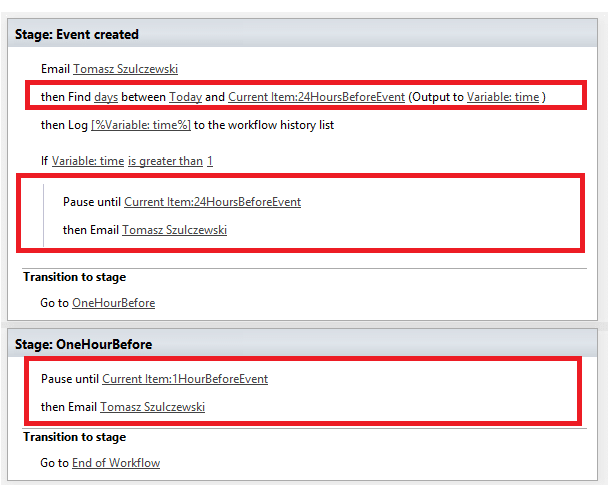
WorkFlow For Event Notification
This workflow is very simple. In the first step it will send message that new event has been created. Then we have to check if the end of event time is less than 24 hours. In such case we don’t use notification for 24 hours before, but only one hour before. In other case we will pause the workflow until time which is stored in our column “24HoursBeforeEvent”. And then we will send a message to the users. And then we will make the same for one hour before the event. We pause the workflow until it reach value which is stored in “1HourBeforeEvent, and then it will send final notification message. Fast and simple to create SharePoint calendar notification. Isn’t it? This solution works for SharePoint on premise and SharePoint online also.


0 Comments