Quick answer is: "Intune is a solution for me that allows me to manage computers scattered all over the world".
When I wrote "Modern IT department", several people asked me: "How it is possible for one person to manage everything?". As it used to be, it's just can't be done.
But when we put everything in the Intune everything becomes simpler. But let's start from the beginning.
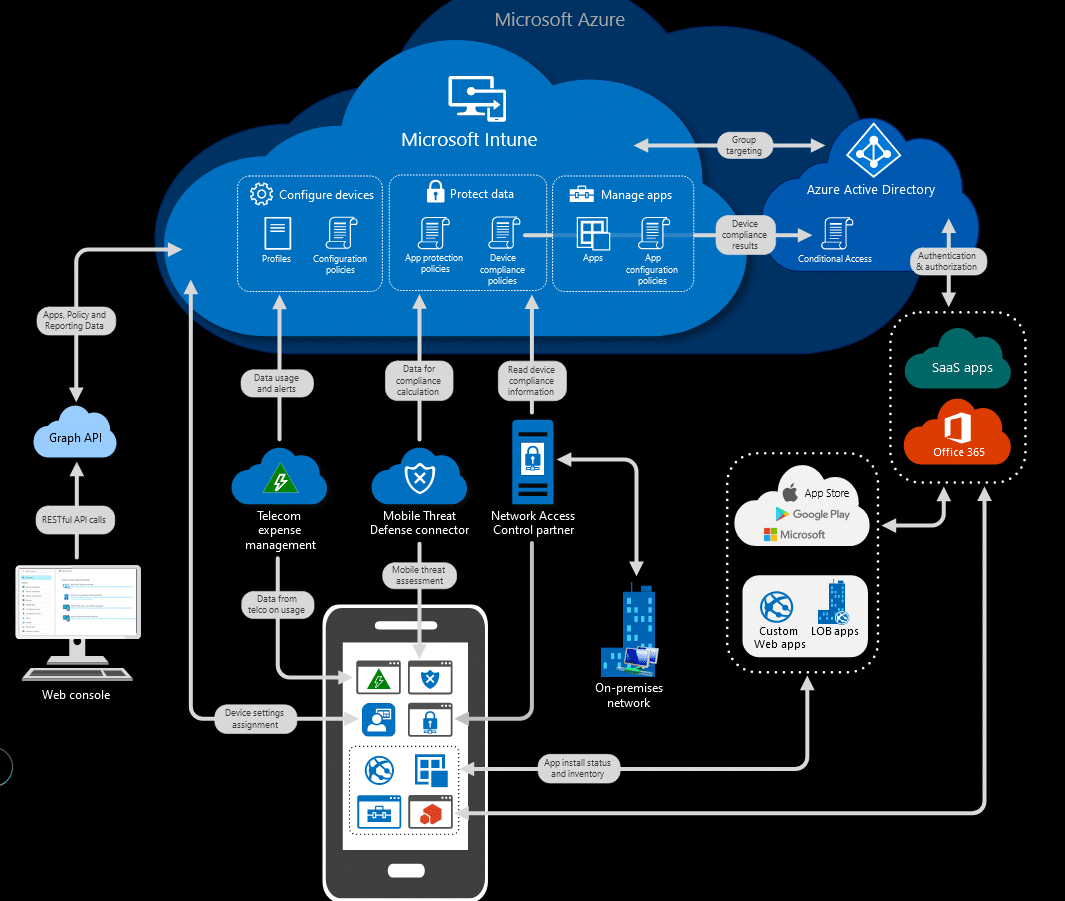
Look at the picture below. In fact, it shows all the magic behind Intune. Any device that wants to use your company's resources that are in the Microsoft cloud will be able to be configured and managed by an administrator.
If the administrator has no control over the device, then he can simply block access. Contrary to appearances, this is important. The beauty, but also quite a big danger lies in the fact that by default the user can log into our resources from any computer and anywhere in the world. Obviously, this carries a certain risk. So how to do that?

How to get Intune?
The easiest and the cheapest will be if you use the license of something called Enterprise Mobility + Security (EMS for short). All you need is version E3. Every user in the tenant will need a license. More information on licensing can be found on the official website. There are also guides on how to get started.

How to start the adventure with Intune?
When you log in to the Intune console for the first time, you won't really find many items there. The first obvious step is to assign a license to each user in our Office 365. You won't do anything without an EMS license. Once this is done, the next step will be adding devices. I will devote an more entry to a more detailed discussion of how to connect devices, including the most obvious one.
If the user has a license assigned, he must perform the following steps on the new computer:
- turn on a computer
- connect to the Wifi network/LAN network
- log in with a user account in our organization - this is a critical point!
- wait for the computer to be set up
Depending on the Internet connection, the computer will be configured. It could take several minutes but all company applications will be installed.
In my next post I will show you a little more about enrolment process. We have a lot of scenarios to consider.


0 Comments