
Very useful feature of SharePoint online is possibility to add external users to our sites. To find what’s external user go to Microsoft site.
In many cases capabilities linked to external users in SharePoint online are sufficient to work and also we avoid additional licenses. One of the the problems which we can be faced is a format of user name. By default user format is created by SharePoint and it’s not user friendly and also it’s not easy to use or manage.
[adblockingdetector id=”5770e6ed85560″]

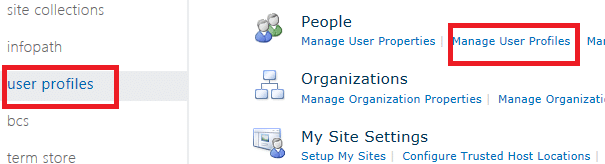
The good thing is that we have possibility to fix the problem. Each external user will appear in SharePoint online user profile. Just go to SharePoint online administration –> user profiles and there “Manage user Profiles”
As the exiting user name has strange format the way to find all external users is to enter “live“ is search box. Now we have to just edit user details and that’s all. Of course it will require some work and if you want to edit many users it require a lot of time, but in such case the best idea is to integrate our Active Directory with SharePoint online and user profiles will pull all data from our AD, but in this case we have to assign license for each user…



0 Comments