No drafts folder Popup when I Check Out a File

by | Oct 9, 2013 | Office 365, SharePoint | 1 comment

One of my client faced a problem with check out process in SharePoint online, which was new to me.

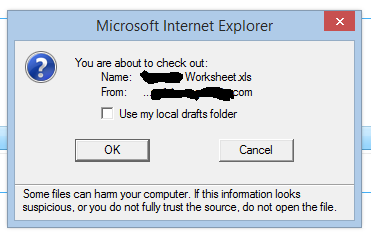
We run SharePoint online P2. In previous versions when we check out document we get pop for local computer draft folder, so we can work later in offline mode. It looks like this.
image

No drafts folder Popup when I Check Out a File

[adblockingdetector id=”5770e6ed85560″]
In SharePoint online we don’t get this popup. And it seems that such behaviour is by design for Office 365.

Actually, the files in SharePoint Online will be opened by Office Web App (when the Office Web App supports the file type). However, we can still use desktop Office suite to open the files in SharePoint Online.

See this graph below:

Without clicking the file name directly, just click the mark “…” and then click EDIT.


Written by Tomasz Szulczewski

Hi, my name is Tomasz Szulczewski, and I have been in love with information technology for over 25 years, but I still have an IT passion and feel like a geek. I am a person who is problem solver who thinks that not all people must be experts in IT.

Related Posts

Power virtual agent for office 365

Power virtual agent for office 365

Why Should I even care about power virtual agent for office 365 or power virtual agent for teams? Simple answer? Do you need an AI assistant who will help you run your business in many different ways? If yes, that's your answer :). But let's start from the beginning....

read more
What is SharePoint in Office 365?

What is SharePoint in Office 365?

What is SharePoint in Office 365, and why is SharePoint for small business the critical product? So you bought a Microsoft 365 license, and your tenant is online. You open a browser, and you have no idea what to do next? Don't worry; I will try to give you a few...

read more

1 Comment

Leave a Reply

This site uses Akismet to reduce spam. Learn how your comment data is processed.