
Missing web part connection in Office 365

by | Nov 10, 2013 | Office 365, SharePoint | 0 comments

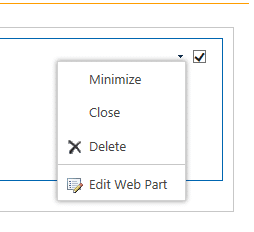
Something what could surprise you when you work with web parts in Office 365 is missing option of web part connection. We put web part on the page base on existing list and we will see something like this:
Web Part

Web Part

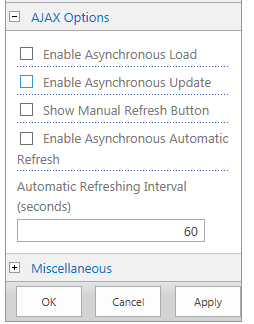
There’s no options to make connection to our web part. Why? To make possible web part connection you have to have possibility to data exchange, and default static state is blocking it. To solve the problem we have to select “Edit web part”. We should see screen like this:
Ajax Options

Ajax Options

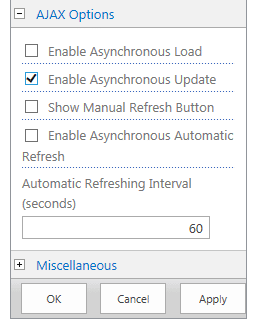
To force web part using connections we have select “Enable Asynchronous Update”
Enable Asynchronous Update

Enable Asynchronous Update

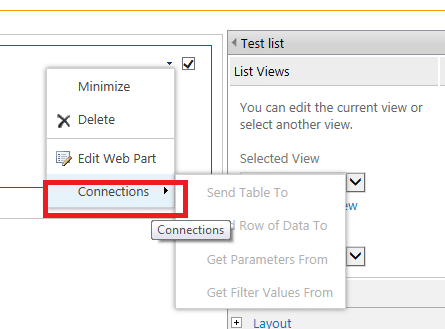
After applying this option connections will appear on the our web part:
Connection

Connection

Written by Tomasz Szulczewski

Hi, my name is Tomasz Szulczewski, and I have been in love with information technology for over 25 years, but I still have an IT passion and feel like a geek. I am a person who is problem solver who thinks that not all people must be experts in IT.

Related Posts

Power virtual agent for office 365

Power virtual agent for office 365

Why Should I even care about power virtual agent for office 365 or power virtual agent for teams? Simple answer? Do you need an AI assistant who will help you run your business in many different ways? If yes, that's your answer :). But let's start from the beginning....

read more
What is SharePoint in Office 365?

What is SharePoint in Office 365?

What is SharePoint in Office 365, and why is SharePoint for small business the critical product? So you bought a Microsoft 365 license, and your tenant is online. You open a browser, and you have no idea what to do next? Don't worry; I will try to give you a few...

read more

0 Comments

Leave a Reply

This site uses Akismet to reduce spam. Learn how your comment data is processed.